
1 परिचय
Thank you for choosing the MageGee MK-Box 60% Mechanical Gaming Keyboard. This compact 68-key keyboard is designed for both gaming and office use, offering a space-saving layout without compromising essential functionality. Featuring responsive red mechanical switches and customizable LED backlighting, the MK-Box provides a comfortable and efficient typing experience. This manual will guide you through the setup, operation, and maintenance of your new keyboard.
2. उत्पाद खत्मview
प्रमुख विशेषताऐं:
- मिनी पोर्टेबल 60% कॉम्पैक्ट लेआउट: The MK-Box features 68 keys, including separate arrow keys and Fn function keys, optimizing desk space while retaining necessary functions.
- Mechanical Red Switches: Characterized by a linear and smoother feel with minimal resistance, these switches offer fast action without a tactile bump, making typing and gaming effortless.
- Classic Charming Blue LED Backlit: Customize your experience with approximately 16 illuminated LED light effects. Adjust backlight modes, speed, and brightness using simple key combinations.
- Full Anti-Ghosting: सभी 68 कुंजियाँ संघर्ष-मुक्त हैं, जिससे यह सुनिश्चित होता है कि गहन गेमिंग सत्रों के दौरान प्रत्येक कुंजीस्ट्रोक सटीक रूप से पंजीकृत हो।
- एर्गोनोमिक डिजाइन: Features ergonomic suspension double-color injection keycaps, double kickstand feet for adjustable typing angles, and a detachable USB cable for convenience and durability.
- व्यापक संगतता: Compatible with Windows (2000, XP, ME, Vista, 7, 8), Linux, and Mac operating systems. Plug and play, no drivers or software required.
बॉक्स में क्या है:
- MageGee MK-Box Mechanical Keyboard x 1
- Detachable USB-C to USB-A Cable x 1
- Extra Keycaps (e.g., 16 purple keycaps, red WASD keys) x 1 set
- कीकैप पुलर x 1
- उपयोगकर्ता मैनुअल x 1
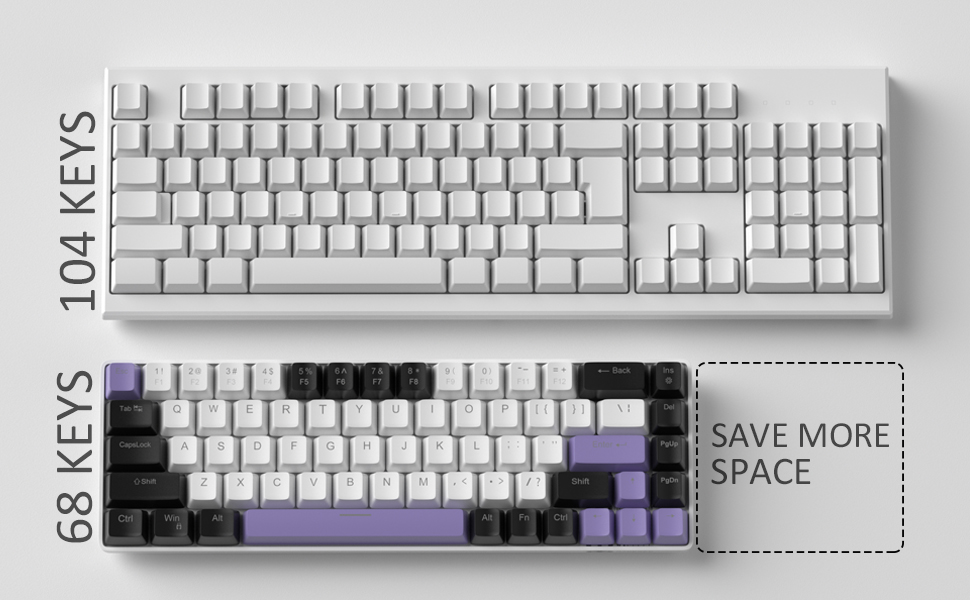
Image: Contents of the MageGee MK-Box packaging, including the keyboard, detachable USB-C cable, extra keycaps, keycap puller, and user manual.
3. सेटअप
- कीबोर्ड कनेक्ट करें: Locate the detachable USB-C cable. Plug the USB-C end into the port on the left side of the keyboard and the USB-A end into an available USB port on your computer (Laptop, PC, Mac).
Image: Close-up of the detachable USB-C port on the side of the MageGee MK-Box keyboard, with the cable being inserted.
- टाइपिंग कोण समायोजित करें: Flip the keyboard over to reveal the double kickstand feet. Gently pull out the feet to adjust the keyboard to your preferred typing angle for ergonomic comfort. There are two levels of adjustment.
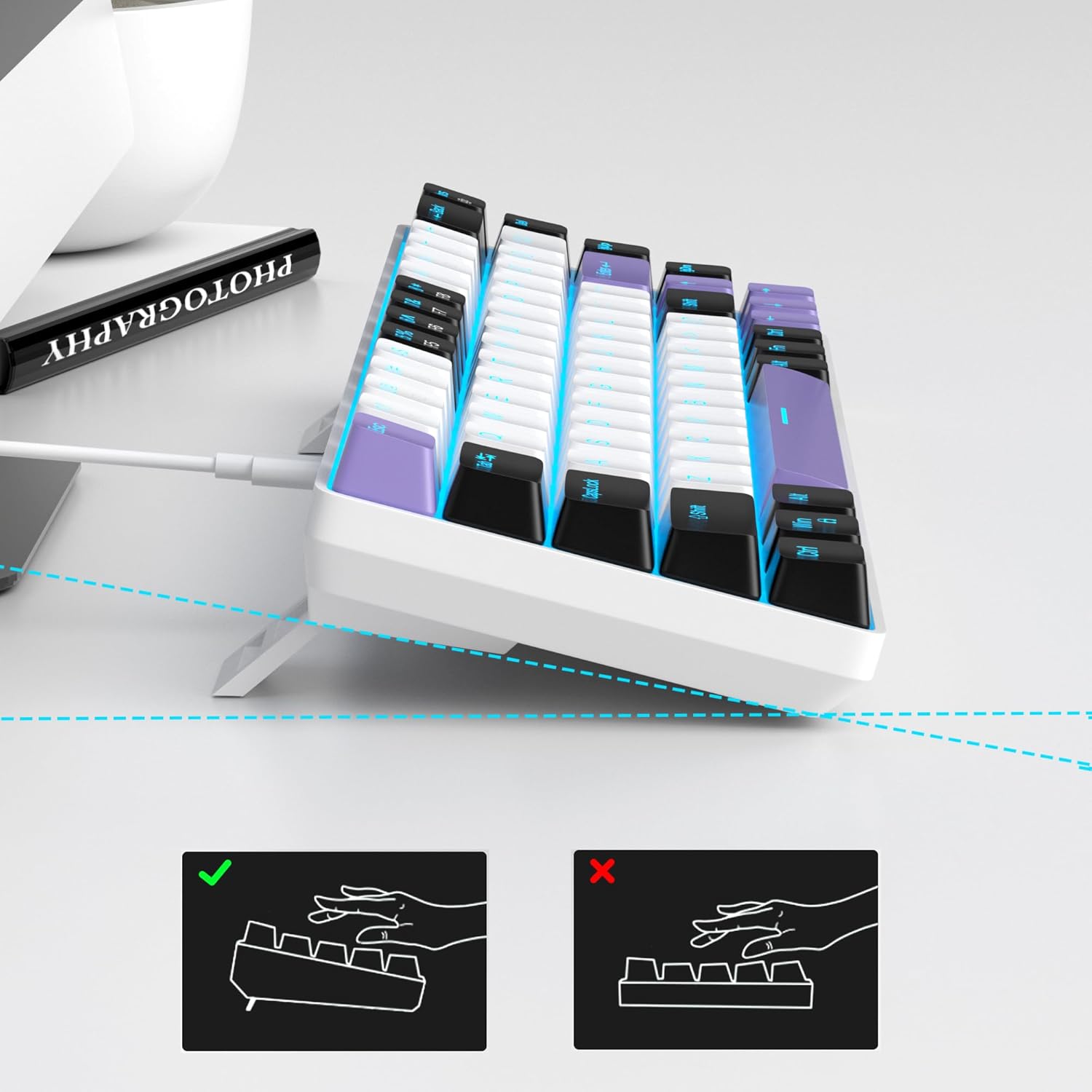
Image: The MageGee MK-Box keyboard shown from a side angle with its adjustable feet extended, illustrating the ergonomic tilt for comfortable typing.
- सिस्टम पहचान: Your computer should automatically recognize the keyboard. No additional drivers or software installation is required.
4. संचालन निर्देश
बुनियादी प्रमुख कार्य:
- The keyboard features a standard QWERTY layout with 68 keys.
- Dedicated arrow keys are located on the bottom right.
- Function keys (F1-F12) are accessed via the Fn key in combination with the number row keys.
बैकलाइट नियंत्रण:
The MageGee MK-Box features a classic blue LED backlight with multiple modes and adjustable settings.
- बैकलाइट मोड बदलें: प्रेस एफएन + इंस to cycle through approximately 16 different backlight effects.
- बैकलाइट गति समायोजित करें: प्रेस Fn + ← (बायां तीर) गति कम करने या Fn + → (दायाँ तीर) गति बढ़ाने के लिए।
- बैकलाइट चमक समायोजित करें: प्रेस Fn + ↓ (नीचे की ओर तीर) to decrease brightness or Fn + ↑ (ऊपर की ओर तीर) चमक बढ़ाने के लिए.

Image: A diagram illustrating the key combinations for controlling the backlight effects, speed, and brightness on the MageGee MK-Box keyboard.
5. रखरखाव
- सफाई: Use a soft, dry cloth to wipe down the keyboard surface. For deeper cleaning, you can use a can of compressed air to remove dust and debris from between the keycaps.
- कीकैप हटाना: To clean under the keycaps or replace them with the provided extra keycaps, use the included keycap puller. Gently attach the puller to a keycap and pull straight up. When reattaching, align the keycap with the switch stem and press down firmly until it clicks into place.
- केबल की देखभाल: The detachable USB-C cable should be handled with care. Avoid sharp bends or excessive pulling to prevent damage.

Image: A close-up of the keycap puller tool, used for safely removing and replacing keycaps on the mechanical keyboard.
6। समस्या निवारण
- कीबोर्ड प्रतिक्रिया नहीं दे रहा है:
- सुनिश्चित करें कि यूएसबी केबल कीबोर्ड और आपके कंप्यूटर दोनों से सुरक्षित रूप से जुड़ा हुआ है।
- अपने कंप्यूटर पर कीबोर्ड को किसी अन्य USB पोर्ट में प्लग करने का प्रयास करें।
- कंप्यूटर-विशिष्ट समस्या से बचने के लिए कीबोर्ड को किसी अन्य कंप्यूटर पर परीक्षण करें।
- Backlight Not Working/Incorrect:
- सुनिश्चित करें कि कीबोर्ड ठीक से कनेक्ट है और उसे पावर मिल रही है।
- प्रेस एफएन + इंस to cycle through backlight modes, as it might be set to an 'off' mode.
- का उपयोग करके चमक समायोजित करें Fn + ↑/↓.
- Keys Not Registering (Ghosting):
- The MK-Box features full anti-ghosting. If you experience issues, ensure no debris is lodged under the keycaps.
- Try reconnecting the keyboard or restarting your computer.
7. विनिर्देश
| विशेषता | विवरण |
|---|---|
| ब्रांड | MageGee |
| मॉडल नाम | MK-Box |
| कीबोर्ड विवरण | यांत्रिक |
| कुंजियों की संख्या | 68 |
| स्विच प्रकार | Linear (Red Switch) |
| कनेक्टिविटी प्रौद्योगिकी | यूएसबी (वायर्ड) |
| संगत डिवाइस | लैपटॉप, पीसी |
| संगत ऑपरेटिंग सिस्टम परिवार | विंडोज़, लिनक्स, मैक |
| विशेष सुविधा | 60% Mechanical Design, LED Backlit, Anti-Ghosting |
| कीबोर्ड विन्यास | Qwerty |
| सामग्री | प्लास्टिक |
| जल प्रतिरोध स्तर | जल प्रतिरोधी नहीं |
8. वारंटी और समर्थन
MageGee products are designed for durability and performance. For any product-related inquiries, technical support, or warranty claims, please refer to the contact information provided on the product packaging or visit the official MageGee webकृपया वारंटी सेवा के लिए अपनी खरीद का प्रमाण संभाल कर रखें।