
1. महत्वपूर्ण सुरक्षा जानकारी
असेंबल करने और उपयोग करने से पहले सभी निर्देशों को ध्यानपूर्वक पढ़ें। इन निर्देशों का पालन न करने पर चोट लग सकती है या उत्पाद को नुकसान हो सकता है।
- Always keep children and pets away from the desk when in motion.
- Use the child lock feature (if available) to prevent unintended height adjustments.
- Be aware of the anti-collision feature; do not force the desk to move if it encounters an obstacle.
- ऊंचाई को समायोजित करते समय उलझने से बचने के लिए सुनिश्चित करें कि सभी केबल ठीक से व्यवस्थित हों।
- Do not overload the desk. The maximum weight capacity is 180 lbs.
- डेस्क का प्रयोग केवल समतल सतह पर ही करें।
2. पैकेज सामग्री
असेंबली शुरू करने से पहले, सुनिश्चित करें कि सभी पुर्जे मौजूद हैं। अगर कोई पुर्जा गायब या क्षतिग्रस्त है, तो कृपया ग्राहक सहायता से संपर्क करें।
- Desktop (0.6" thick, Rustic Brown)
- डेस्क पैर (2)
- Foot Pads (2)
- Crossbar/Frame Assembly
- Control Panel with LED Touchscreen
- पावर एडाप्टर और केबल
- हेडफोन हुक
- Assembly Hardware (screws, L-shaped installation tools)
- उपयोगकर्ता पुस्तिका
3. असेंबली निर्देश
The DEVAISE ASJZ021 desk is designed for quick and simple assembly, typically within 15 minutes. All holes are pre-drilled, and accessories are clearly labeled.
उपकरण की आवश्यकता:
- फिलिप्स हेड स्क्रूड्राइवर (शामिल नहीं)
- L-shaped installation tools (included)
चरण-दर-चरण असेंबली:
- घटकों को अनपैक करें: पैकेजिंग से सभी भागों को सावधानीपूर्वक निकालें और खरोंच से बचाने के लिए उन्हें साफ, मुलायम सतह पर रखें।
- फुट पैड लगाएं: Secure the foot pads to the bottom of each desk leg using the provided screws.
- फ़्रेम को इकट्ठा करें: Connect the desk legs to the crossbar/frame assembly. Ensure all connections are tight and secure.
- डेस्कटॉप संलग्न करें: Carefully place the desktop onto the assembled frame. Align the pre-drilled holes on the desktop with the frame. Secure the desktop to the frame using the provided screws.
- कंट्रोल पैनल इंस्टॉल करें: Mount the LED touchscreen control panel to the underside of the desktop in the designated location. Connect the control panel cable to the motor.
- पावर कनेक्ट करें: Plug the power adapter into the desk's motor and then into a wall outlet.
- हेडफोन हुक लगाएं: Install the headphone hook to the side of the desk as desired.

छवि: विस्फोटित view of desk components illustrating the 15-minute quick installation process.
4. संचालन निर्देश
The DEVAISE ASJZ021 Electric Standing Desk features a tri-motor system for smooth and quiet height adjustments and a smart LED touchscreen controller.
कंट्रोल पैनल ओवरview:

छवि: विस्तृत view of the multi-function control panel with LED display, up/down arrows, memory presets (1, 2, 3), and 'S' button.
- नेतृत्व में प्रदर्शन: Shows the current desk height in real-time.
- ऊपर/नीचे तीर (▲ / ▼): Press and hold to adjust the desk height manually. Release to stop at the desired height.
- मेमोरी प्रीसेट (1, 2, 3): Store and recall up to three personalized height settings.
- 'S' बटन: Used for saving memory presets and activating the child lock function.
ऊंचाई समायोजन:
The desk can be adjusted between 28.35 inches (sitting height) and 46.45 inches (standing height).

Image: Comparison of the desk at its minimum height of 28.35 inches and maximum height of 46.45 inches.
- मैनुअल समायोजन: Press and hold the ▲ (Up) or ▼ (Down) button until the desk reaches your desired height.
- मेमोरी प्रीसेट सेट करना:
- Adjust the desk to your preferred height using the Up/Down buttons.
- Press the 'S' button. The LED display will show 'S-'.
- Immediately press one of the memory buttons (1, 2, or 3). The display will show 'S-1', 'S-2', or 'S-3' to confirm the height is saved.
- Recalling Memory Presets: Simply press the corresponding memory button (1, 2, or 3) once. The desk will automatically move to the saved height.
शांत संचालन:
The tri-motor system operates quietly, typically below 50dB, ensuring minimal disruption in your workspace.

Image: Graphic illustrating the quiet operation of the desk, comparing its sound level (below 50dB) to soft breaths (10dB), whisper (25dB), and car horns (80dB).
5. विनिर्देश
Detailed technical specifications for the DEVAISE ASJZ021 Electric Standing Desk.
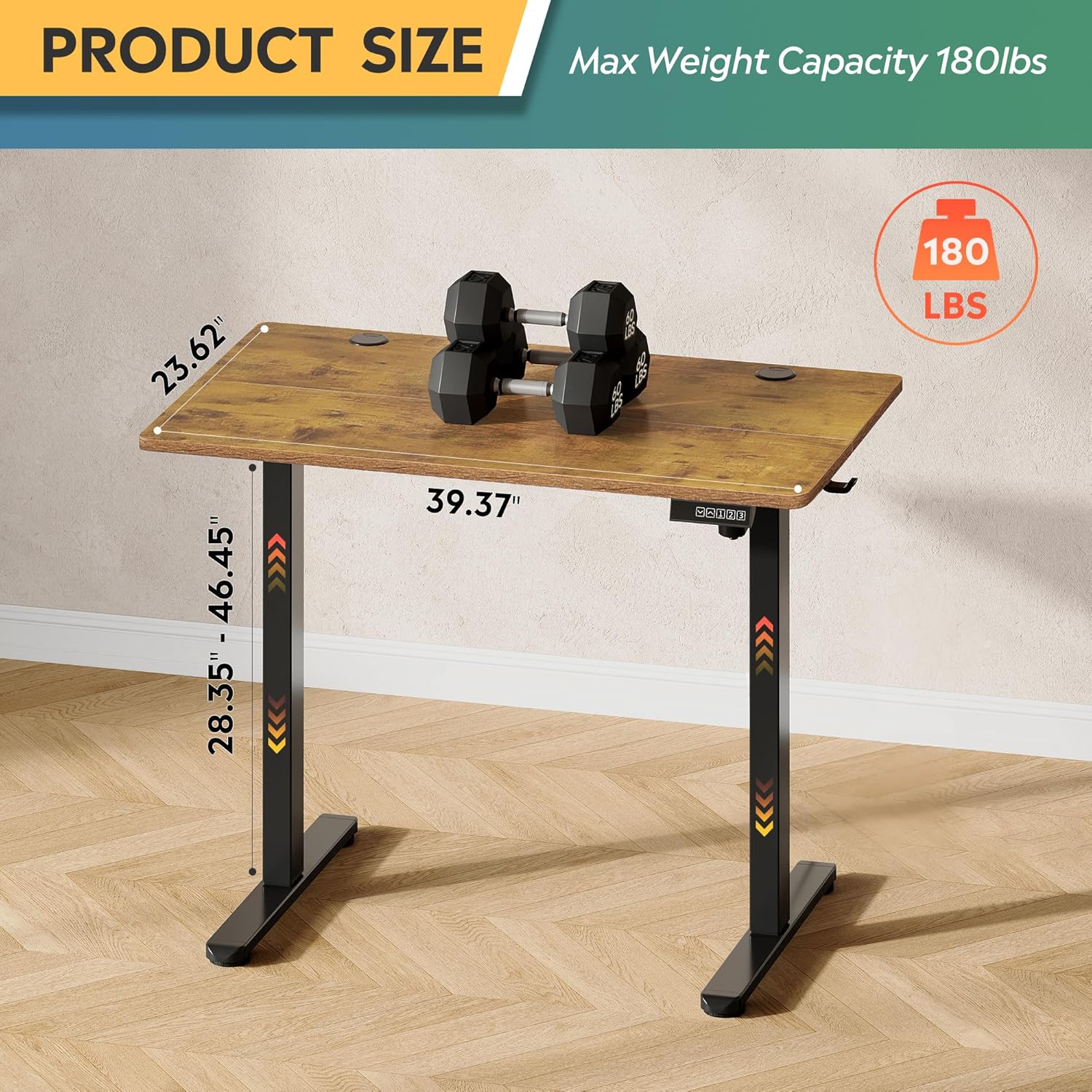
Image: Product dimensions (39.37"W x 23.62"D) and height range (28.35"-46.45"), highlighting the 180 lbs maximum weight capacity.
| विशेषता | विनिर्देश |
|---|---|
| मॉडल संख्या | ASJZ021 |
| उत्पाद आयाम (डी x डब्ल्यू x एच) | 23.62"डी x 39.37"डब्ल्यू x 28.34"एच |
| न्यूनतम ऊंचाई | 28.35 इंच |
| ज्यादा से ज्यादा ऊंचाई | 46.45 इंच |
| टेबलटॉप मोटाई | 0.6 इंच |
| अधिकतम वजन की अनुशंसा | 180 पाउंड |
| आइटम का वजन | 37 पाउंड |
| उठाने की प्रणाली | Electric (Tri-motor system) |
| ऊंचाई पदों की संख्या | 3 मेमोरी प्रीसेट |
| शोर स्तर | <50डीबी |
| शीर्ष सामग्री प्रकार | इंजीनियर लकड़ी |
| मूलभूत सामग्री | लोहा |
| रंग | Rustic Brown (Desktop), Black (Base) |
| विशेष लक्षण | Adjustable Height, Compact, Electric, LED Touchscreen |
6. रखरखाव
नियमित रखरखाव से आपके स्टैंडिंग डेस्क की लंबी आयु और इष्टतम प्रदर्शन सुनिश्चित करने में मदद मिलती है।
- सफाई: डेस्कटॉप और फ्रेम को मुलायम कपड़े से पोंछेंamp कपड़े पर रगड़ें। कठोर रसायनों या घर्षणकारी क्लीनर से बचें जो फिनिश को नुकसान पहुंचा सकते हैं।
- तार प्रबंधन: Periodically check and organize cables to prevent them from snagging or getting pinched during height adjustments.
- पेंच कसाव: समय-समय पर सभी पेंचों और बोल्टों की जांच करते रहें ताकि यह सुनिश्चित हो सके कि वे ठीक से कसे हुए हैं। आवश्यकता पड़ने पर उन्हें फिर से कस दें।
- मोटर निरीक्षण: Listen for any unusual noises during operation. If you notice any issues, refer to the troubleshooting section or contact support.
7। समस्या निवारण
If you encounter any issues with your DEVAISE ASJZ021 Electric Standing Desk, please refer to the following common problems and solutions.
| संकट | संभावित कारण | समाधान |
|---|---|---|
| डेस्क हिलता नहीं है | बिजली का तार टूट गया; ओवरलोड; मोटर में खराबी | Check power connections. Reduce weight on desk. Unplug for 10 seconds, then plug back in. |
| असमान ऊंचाई समायोजन | अवरोध; सेंसर की समस्या | Clear any obstructions. Perform a reset (refer to control panel instructions or contact support). |
| डिस्प्ले पर एक त्रुटि कोड दिखाई देता है | Specific system error | Note the error code and consult the DEVAISE support webविशिष्ट मार्गदर्शन के लिए वेबसाइट देखें या ग्राहक सेवा से संपर्क करें। |
| Desk stops moving unexpectedly | Anti-collision activated; Overheating protection | Check for obstructions. Allow the motor to cool down for 20 minutes before attempting to operate again. |
If the problem persists after attempting these solutions, please contact DEVAISE customer support.
8. वारंटी और समर्थन
DEVAISE is committed to providing quality products and customer satisfaction. Your purchase is backed by our support services.
- ग्राहक सहेयता: For any questions, concerns, or assistance with assembly or operation, please contact our 24/7 US-based support team. Refer to your purchase documentation for contact details.
- वारंटी जानकारी: Specific warranty terms and conditions may vary. Please refer to the warranty card included with your product or visit the official DEVAISE webविस्तृत जानकारी के लिए साइट देखें.