
BAOFENG 5RH Pro GPS
BAOFENG 5RH Pro GPS Walkie Talkie
उपयोगकर्ता पुस्तिका
उत्पाद खत्मview
The BAOFENG 5RH Pro GPS Walkie Talkie is a robust communication device designed for various applications, including outdoor activities and emergency response. It integrates advanced features such as GPS positioning, Automatic Position Reporting System (APRS), and NOAA weather alerts, ensuring reliable performance and enhanced safety. This model features a 1.77-inch TFT color screen, a full keyboard for direct frequency input, and a user-friendly menu system.
टिप्पणी: The GPS type 5RH Pro model does not include a flashlight feature.
शामिल घटक:
- 1x BAOFENG 5RH Pro GPS Radio
- 1x यूएसबी-सी केबल
- 1x High Gain Original Antenna
- 1x 2500mAh Enlarge Capacity Battery
- 1x Desktop Charger
- 1x बेल्ट क्लिप
- 1x हाथ का पट्टा
- 1x अंग्रेजी मैनुअल
- 1x 771 Antenna
- 1x Shoulder Speaker Microphone
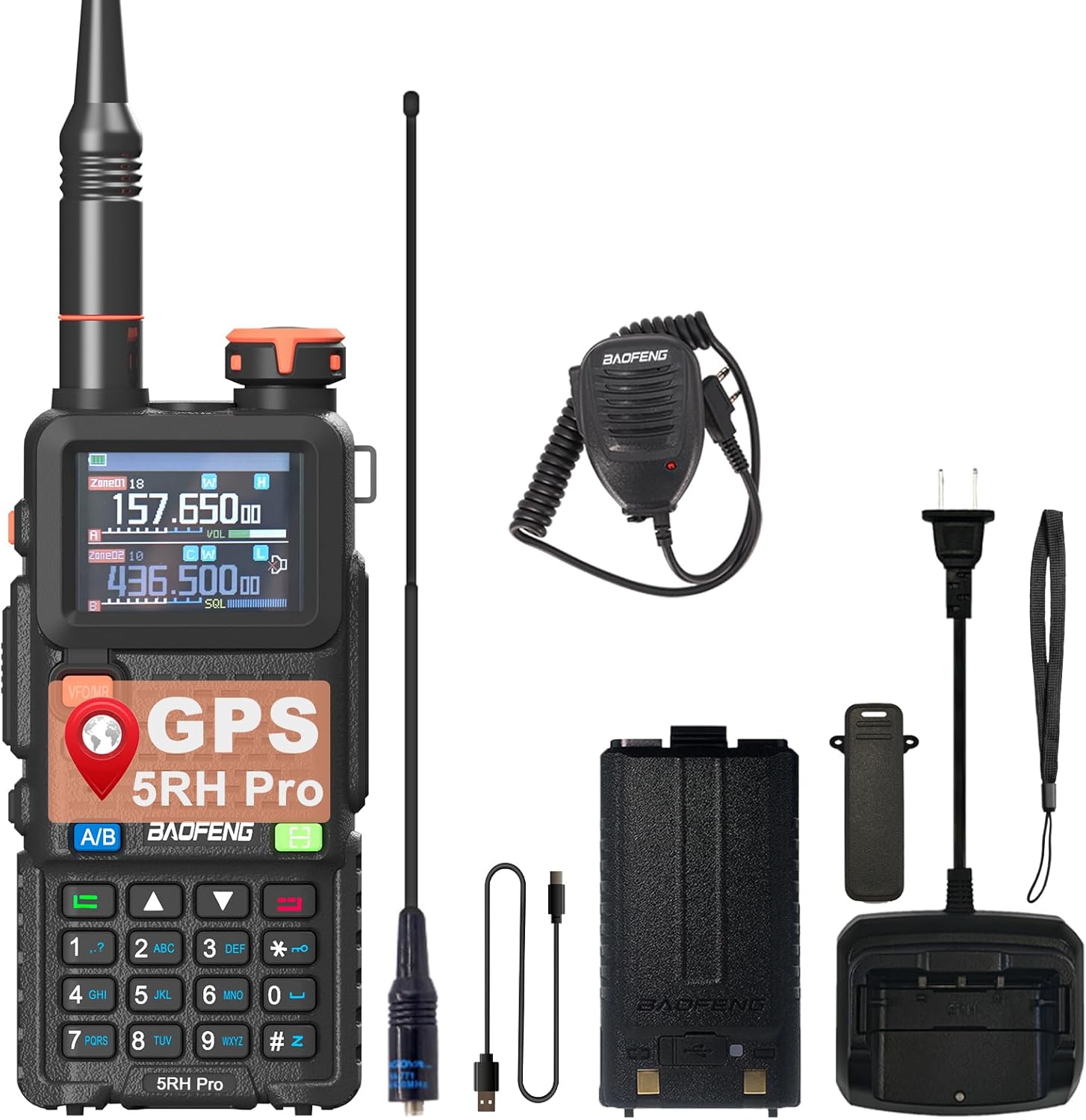
Image: The BAOFENG 5RH Pro GPS Walkie Talkie displayed with all its standard accessories, including the radio unit, antennas, battery, charger, USB-C cable, belt clip, hand strap, and shoulder speaker microphone.
सेटअप गाइड
1. बैटरी स्थापना:
- Align the 2500mAh battery with the battery compartment on the back of the radio.
- Slide the battery upwards until it clicks securely into place.
2. एंटीना अटैचमेंट:
- Screw the desired antenna (High Gain Original or 771 Antenna) clockwise onto the antenna connector at the top of the radio until it is finger-tight. Do not overtighten.
3. प्रारंभिक चार्जिंग:
Before first use, fully charge the battery. The radio supports USB-C direct charging and desktop charger charging.
- USB-C केबल का उपयोग: Insert the USB-C cable into the radio's charging port and connect the other end to a compatible USB power source (e.g., laptop, car charger, power bank).
- Using Desktop Charger: Place the radio (with battery installed) into the desktop charging cradle. Ensure the charging indicator light illuminates.

Image: Demonstrates the versatility of USB-C charging for the BAOFENG 5RH Pro, showing connections to a laptop, standard USB adapter, car charger, and power bank, alongside the traditional desktop charging dock.
ऑपरेटिंग निर्देश
बिजली चालू/बंद:
Rotate the power/volume knob clockwise to turn the radio on. Continue rotating to adjust the volume. Rotate counter-clockwise until a click is heard to turn the radio off.
प्रदर्शन और नेविगेशन:
The 1.77-inch TFT screen provides clear display of frequencies, channel names, and menu options. Use the navigation keys and full keyboard to access and adjust settings.

Image: Highlights the 1.77-inch LCD screen of the BAOFENG 5RH Pro, emphasizing its clear display, dual display capability, support for 640 channels, and English menu interface.
GPS Positioning Function:
The integrated GPS module allows for accurate real-time positioning. This feature enables location sharing and requesting location information from other compatible devices.

Image: Illustrates the GPS (Global Positioning System) functionality of the BAOFENG 5RH Pro, showing how it ensures accurate real-time positioning and location sharing on a global map background.
APRS (Automatic Position Reporting System):
The APRS feature allows the radio to automatically update your location to companions or rescue teams in real-time, enhancing safety during outdoor activities.
Falling Alarm:
This safety feature can detect if the radio user has fallen and can trigger an alarm, which can be crucial for seeking help in outdoor or emergency situations.

Image: Explains the Falling Alarm feature, indicating its utility for seeking help when injured outdoors, and details the APRS (Automatic Position Reporting System) for real-time location updates to rescue teams.
One Key Copy Frequency:
This function simplifies frequency matching with other radios.
- स्टेप 1: Turn on the radio. Press and hold the designated button (often indicated by a search icon) until the screen displays "SEARCH". The radio will begin seeking a signal.
- स्टेप 2: While the radio is searching, press and hold the transmit button on the other radio you wish to copy the frequency from. Once the 5RH Pro finishes searching and displays the frequency and decode information, press the confirmation button.
- स्टेप 3: Switch to channel mode to select the newly copied channel. The screen will show the frequency of the counterpart, allowing for immediate communication.

Image: Step-by-step guide on how to use the "One Key Match Frequency" feature on the BAOFENG 5RH Pro, illustrating the process of searching, decoding, and confirming frequencies from another radio.
एनओएए मौसम चैनल:
Access NOAA weather channels to receive real-time weather updates and alerts, providing crucial information for safety during severe weather conditions.
VOX (Voice Activated Transmit):
Enables hands-free operation by transmitting automatically when your voice is detected.
दोहरी घड़ी:
Allows monitoring of two different frequencies or channels simultaneously.
अन्य कार्य:
- Built-in CTCSS/DCS tones for selective signaling.
- VFO scan range setting.
- Cross band reception.
- Analog signaling: DTMF, 2TONE, 5TONE, BDC1200 codecs.
- Roger Beep (End Transmission Tone).
- TO/CO/SE Scan Resume methods.
- Adjustable Screen Brightness and Backlight Duration.
- Repeater Access Tone (1000/1450/1750/2100Hz).
- One Touch call.
- SOS function.
रखरखाव
सफाई:
रेडियो की सतह को मुलायम कपड़े से पोंछें।amp कपड़े से साफ करें। कठोर रसायनों या खुरदरे क्लीनर का प्रयोग न करें। उपयोग या चार्जिंग से पहले सुनिश्चित करें कि रेडियो सूखा हो।
बैटरी की देखभाल:
To prolong battery life, avoid overcharging or completely draining the battery. Store the battery in a cool, dry place when not in use for extended periods.
भंडारण:
Store the radio in a dry, dust-free environment away from direct sunlight and extreme temperatures. Remove the battery if storing for a long duration.
समस्या निवारण
Radio Does Not Power On:
- सुनिश्चित करें कि बैटरी ठीक से स्थापित है और पूरी तरह चार्ज है।
- Check the battery contacts for any dirt or corrosion.
Cannot Transmit or Receive:
- Verify that the antenna is securely attached.
- Check if the radio is on the correct frequency or channel.
- Ensure CTCSS/DCS settings match those of the other radio.
- Confirm that the battery has sufficient charge.
Issues with Channel Saving/Programming:
Some users have reported difficulties with programming software or firmware related to saving channels. Ensure you are using the latest official programming software and firmware available from BAOFENG or authorized distributors. Consult online communities or the manufacturer's support for specific programming guidance.
जीपीएस काम नहीं कर रहा है:
- Ensure the radio has a clear view of the sky for satellite acquisition.
- Check GPS settings within the radio's menu to ensure it is enabled.
विशेष विवरण
| विशेषता | विनिर्देश |
|---|---|
| मॉडल संख्या | 5RH Pro GPS |
| स्क्रीन प्रकार | 1.77 इंच टीएफटी एलसीडी |
| चैनलों की संख्या | 640 |
| आवृति सीमा | 136-174 मेगाहर्ट्ज, 400-470 मेगाहर्ट्ज |
| ट्यूनर प्रौद्योगिकी | यूएचएफ/वीएचएफ |
| बातचीत की अधिकतम सीमा | 5 मील |
| बैटरी प्रकार | 1 लिथियम आयन बैटरी (2500mAh) |
| चार्जिंग प्रकार | USB-C, Desktop Charger |
| वॉल्यूमtage | 7.4 वोल्ट (डीसी) |
| जल प्रतिरोध स्तर | जल प्रतिरोधी |
| उत्पाद आयाम | 1.57 x 2.36 x 12.79 इंच |
| आइटम का वजन | 1.67 पाउंड |
| उद्गम देश | चीन |
वारंटी और समर्थन
वारंटी जानकारी:
A 1-year warranty is provided for this product. This warranty is exclusively offered through "Shiqun Electronics Co., Ltd". Please retain your proof of purchase for warranty claims.
ग्राहक सहेयता:
For technical assistance, troubleshooting beyond this manual, or warranty inquiries, please contact the seller or manufacturer directly. Refer to the contact information provided with your purchase or visit the official BAOFENG webसहायता संसाधनों के लिए साइट.