
TCL W8W9E2-B3
TCL 8,000 BTU Smart Window Air Conditioner User Manual
Model: W8W9E2-B3
1 परिचय
Thank you for choosing the TCL 8,000 BTU Smart Window Air Conditioner, Model W8W9E2-B3. This unit is designed to provide powerful and efficient cooling for rooms up to 350 sq. ft. With smart features, energy-saving modes, and convenient controls, your TCL air conditioner will help you maintain a comfortable indoor environment.
This manual provides essential information for the safe and effective operation and maintenance of your air conditioner. Please read it thoroughly before installation and use, and keep it for future reference.
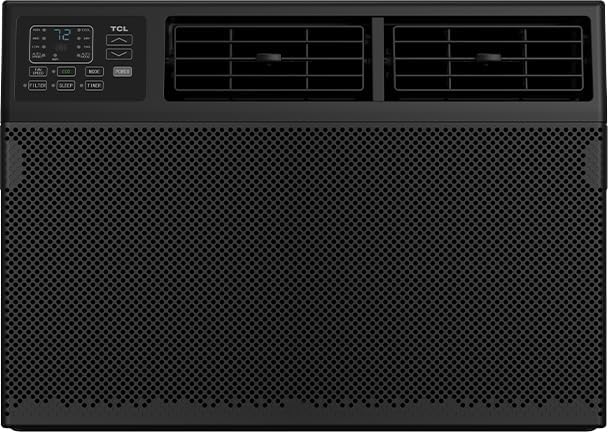
चित्र 1: सामने view of the TCL 8,000 BTU Smart Window Air Conditioner, showcasing its black design and digital display.
2. सेटअप और इंस्टालेशन
The TCL 8,000 BTU Smart Window Air Conditioner comes with an easy-to-use installation kit for convenient setup. Proper installation is crucial for optimal performance and safety.
2.1 Window Size Requirements
- चौड़ाई: 26-36 इंच
- ऊंचाई: 14.5 इंच
2.2 स्थापना चरण (सारांश)
While a detailed guide is included with your unit, here is a summary of the general installation process:
- Prepare the window opening, ensuring it meets the specified dimensions.
- Attach the top mounting rail and side panels to the air conditioner unit.
- Carefully place the unit into the window opening, ensuring it is level or slightly tilted outwards for proper drainage.
- Extend the side panels to fill the window opening and secure them.
- Install the window sash seal and any additional sealing materials to prevent air leakage.
- यूनिट को एक ग्राउंडेड इलेक्ट्रिकल आउटलेट में प्लग करें।
Always refer to the detailed installation instructions provided in the box for complete and accurate steps.
3. संचालन निर्देश
Your TCL air conditioner offers various modes and features for personalized comfort. You can control the unit using the intuitive LED display on the unit or the included remote control.
3.1 नियंत्रण कक्ष और रिमोट कंट्रोल
The unit features an LED display and control buttons. All functions available on the unit's control panel are also accessible via the remote control, providing convenient operation from anywhere in the room.
- बिजली का बटन: यूनिट को चालू या बंद करता है.
- अच्छा मोड: Activates cooling function.
- पंखे की गति: पंखे की गति को समायोजित करता है (जैसे, कम, मध्यम, उच्च)।
- स्लीप मोड: Gradually increases temperature during sleep for energy saving and comfort.
- टाइमर: Sets a specific time for the unit to turn On or Off automatically.
- पारिस्थितिकी प्रणाली: Optimizes energy consumption by cycling the compressor On and Off to maintain the set temperature.
- स्वचालित स्थिति: Automatically selects the operating mode (Cool, Fan) and fan speed based on the room temperature.
- प्रदर्शन बटन: Controls the illumination of the LED display.
- केवल प्रशंसक: Operates the fan without cooling, for air circulation.
The unit also features two 4-way vents, allowing you to direct airflow precisely where it's needed most.
3.2 Smart Features (App & Voice Control)
Control your air conditioner remotely using the dedicated smartphone app or simple voice commands with Alexa and Google Assistant. This allows you to:
- Change temperature settings.
- Set daily or weekly schedules.
- Switch between different operating modes and fan speeds.
- इकाई की स्थिति पर नज़र रखें.
4. रखरखाव
Regular maintenance ensures your TCL air conditioner operates efficiently and prolongs its lifespan.
4.1 एयर फिल्टर की सफाई
The unit is equipped with a washable and reusable filter that helps protect the AC and reduces airborne particles like dust and pet hair. It is recommended to clean the filter regularly, typically every two weeks, or more often depending on usage and air quality.
- बंद करें और एयर कंडीशनर को अनप्लग करें।
- Locate and remove the air filter (usually behind the front grille).
- Wash the filter with warm, soapy water. For heavily soiled filters, a vacuum cleaner can be used first to remove loose dirt.
- फ़िल्टर को अच्छी तरह से धो लें और यूनिट में दोबारा लगाने से पहले उसे पूरी तरह से हवा में सूखने दें।
बिना फिल्टर लगाए एयर कंडीशनर का संचालन न करें।
4.2 सामान्य सफाई
यूनिट के बाहरी हिस्से को मुलायम, डी से पोंछेंamp कपड़े पर रगड़ें। कठोर रसायनों, अपघर्षक पदार्थों या विलायकों का प्रयोग न करें, क्योंकि ये सतह को नुकसान पहुँचा सकते हैं।
5। समस्या निवारण
If you encounter issues with your air conditioner, refer to the following common troubleshooting tips before contacting customer support.
- यूनिट चालू नहीं होती:
- Check if the power cord is securely plugged into a grounded outlet.
- सत्यापित करें कि सर्किट ब्रेकर ट्रिप नहीं हुआ है।
- Ensure the unit is not in Timer mode set to turn off.
- यूनिट ठीक से ठंडा नहीं कर रही है:
- Check if the air filter is clean and not obstructed.
- Ensure windows and doors are closed to prevent warm air from entering the room.
- Verify that the temperature setting is lower than the room temperature.
- Check for any obstructions blocking the air intake or exhaust vents.
- Ensure the unit size is appropriate for the room area (up to 350 sq. ft.).
- Water dripping from the unit:
- Ensure the unit is installed with a slight downward tilt towards the outside for proper drainage.
- Check if the drain pan is full or clogged.
- असामान्य शोर:
- A slight rattling or gurgling sound is normal due to refrigerant flow.
- Check for loose parts or obstructions in the fan area.
If the problem persists after trying these solutions, please contact TCL customer support.
6. विनिर्देश
| विशेषता | विवरण |
|---|---|
| ब्रांड | टीसीएल |
| मॉडल संख्या | W8W9E2-B3 |
| शीतलन शक्ति | 8,000 बीटीयू |
| कवरेज क्षेत्र | 350 वर्ग फुट तक |
| स्थापना प्रकार | खिड़की |
| नियंत्रण विधि | ऐप, रिमोट, वॉयस |
| आइटम का वजन | 45.3 पाउंड |
| उत्पाद आयाम (WxDxH) | 18.58" x 15.59" x 13.31" |
| एनर्जी स्टार प्रमाणित | हाँ |
| शीतल | आर 410ए |
7. वारंटी और समर्थन
7.1 वारंटी जानकारी
This TCL 8,000 BTU Smart Window Air Conditioner comes with a 1 वर्ष की सीमित वारंटीकृपया वारंटी दावों के लिए अपनी खरीद का प्रमाण संभाल कर रखें।
7.2 ग्राहक सहायता
For further assistance, technical support, or warranty inquiries, please visit the official TCL Store or contact their customer service directly.
Ask a question about this manual
Ask about setup, troubleshooting, compatibility, parts, safety, or missing instructions. Manuals+ फिर से होगाview the question and use this page’s manual context to help answer it.