
AUSEK 4K Dual Screen Touch Action Camera
AUSEK® 4K Action Camera User Manual
Model: 4K Dual Screen Touch Action Camera
1 परिचय
This user manual provides comprehensive instructions for the AUSEK® 4K Action Camera. Designed for capturing high-quality video and photos in various environments, including extreme sports and underwater activities, this camera features 4K/60FPS video recording, 24MP photo resolution, Electronic Image Stabilization (EIS), dual touch screens, Wi-Fi connectivity, and remote control capabilities. Please read this manual thoroughly before using your camera to ensure proper operation and to maximize its potential.

Image 1.1: The AUSEK 4K Action Camera, showcasing its dual screens and the included remote control.
2. बॉक्स में क्या है?
Upon unboxing your AUSEK 4K Action Camera, please verify that all the following components are included:
- एक्शन कैमरा
- उपयोगकर्ता पुस्तिका
- Mounts (various types for different applications)
- रिमोट कंट्रोल

Image 2.1: A selection of mounts and accessories typically included with the camera, allowing for versatile attachment options.
3. सेटअप गाइड
3.1. बैटरी स्थापना और चार्जिंग
The camera uses a Li-ion battery. Ensure the battery is fully charged before first use.
- कैमरे के निचले हिस्से में स्थित बैटरी कंपार्टमेंट का ढक्कन खोलें।
- Insert the battery, ensuring the correct polarity.
- बैटरी कम्पार्टमेंट कवर को सुरक्षित रूप से बंद करें।
- Connect the camera to a USB power source using the provided USB cable to charge. The charging indicator light will illuminate.

Image 3.1: An illustration indicating the 1050mAh battery capacity, highlighting its ability to support extended shooting sessions.
3.2. माइक्रोएसडी कार्ड डालना
A high-speed MicroSD card (Class 10 or higher, up to 128GB) is required for recording and is not included.
- कैमरे के किनारे पर स्थित माइक्रोएसडी कार्ड स्लॉट का पता लगाएं।
- माइक्रोएसडी कार्ड को इस तरह डालें कि उसके सुनहरे कॉन्टैक्ट कैमरे के पीछे की ओर हों, और तब तक डालें जब तक वह ठीक से बैठ न जाए।
- निकालने के लिए, कार्ड को तब तक धीरे से अंदर धकेलें जब तक वह बाहर न आ जाए।
3.3. Attaching Mounts
Use the included mounts to attach your camera to various surfaces or gear. Refer to the specific mount instructions for secure attachment.
4. संचालन निर्देश
4.1. पावर ऑन/ऑफ
- पावर ऑन: Press and hold the Power/Mode button (usually on the front or top) for a few seconds until the screen illuminates.
- बिजली बंद: Press and hold the Power/Mode button again for a few seconds until the screen turns off.
4.2. मोड स्विचिंग
अलग-अलग मोड (वीडियो, फोटो, प्लेबैक और सेटिंग्स) के बीच स्विच करने के लिए पावर/मोड बटन को बार-बार दबाएं।
4.3. Recording Video / Taking Photos
- In Video mode, press the Shutter/OK button (usually on top) to start recording. Press again to stop.
- In Photo mode, press the Shutter/OK button to take a photo.
4.4. दोहरी स्क्रीन का उपयोग
The camera features a 2.0-inch rear touch screen and a 1.3-inch front color screen. The front screen is ideal for vlogging and selfies, allowing you to frame yourself easily. The rear screen is for general operation, settings, and playback.
4.5. वाई-फाई कनेक्टिविटी और ऐप नियंत्रण
The camera supports Wi-Fi for remote control via a smartphone or tablet app.
- Download the recommended app (e.g., "XDV Pro 4K" or similar, check user manual for exact app name) from your device's app store.
- On the camera, navigate to the settings menu and enable Wi-Fi. The camera's Wi-Fi name (SSID) and password will be displayed.
- अपने स्मार्टफोन/टैबलेट पर वाई-फाई सेटिंग्स पर जाएं और कैमरे के वाई-फाई नेटवर्क से कनेक्ट करें।
- Open the app. You can now control the camera, view लाइव फूtage, change settings, and download files.

Image 4.1: An illustration showing the camera connected to a smartphone via Wi-Fi, demonstrating remote control and live view capabilities through the dedicated app.
4.6. रिमोट कंट्रोल का उपयोग करना
The included remote control allows for convenient operation from a distance (up to 10 meters).
- लाल बटन: फोटो लेने के लिए दबाएं।
- Gray Button: वीडियो रिकॉर्डिंग शुरू/बंद करने के लिए दबाएँ।

Image 4.2: A close-up of the wireless wrist remote control, highlighting its red button for photo capture and gray button for video recording.
4.7. वाटरप्रूफ केस का उपयोग
The rugged waterproof case protects the camera up to 30 meters underwater and from dust and scratches.
- Ensure the camera is securely placed inside the case and the latch is fully closed before submerging.
- Activate Diving Mode in the camera settings for improved color contrast in underwater footage.

Image 4.3: The action camera enclosed in its waterproof case, demonstrating its capability for underwater use up to 30 meters.
5. मुख्य विशेषताएं समझाई गईं
5.1. 4K Video and 24MP Photos
Capture stunning visuals with professional 4K/60FPS, 2.7K/30FPS, 1080P/120FPS, and 720P/120FPS video resolutions. The camera also supports high-resolution 24MP photos, ensuring crisp and detailed images of your adventures.

Image 5.1: A visual comparison demonstrating the superior clarity and detail of 4K resolution compared to 1080P.
5.2. EIS Stabilization (Electronic Image Stabilization)
The built-in EIS technology intelligently compensates for camera shake, providing smooth and stable video footage even during dynamic activities like skiing, diving, or cycling. This ensures your action shots are clear and professional-looking.
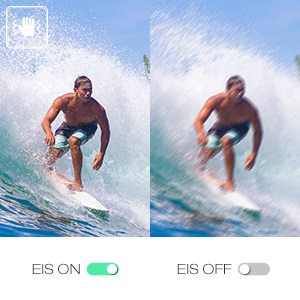
Image 5.2: A side-by-side comparison illustrating the effectiveness of EIS, showing a stable image with EIS on versus a blurry image with EIS off.
5.3. 170° Wide Angle Lens
The camera features a super-wide 170° field of view, allowing you to capture more of your surroundings in a single frame. This is ideal for expansive landscapes, group shots, and immersive action footage.
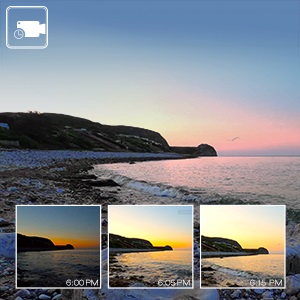
Image 5.3: A diagram illustrating the extensive field of view provided by the 170° wide-angle lens.
5.4. 4X Digital Zoom
The camera supports up to 4X digital zoom, allowing you to get closer to the action without physically moving. This feature is accessible through the camera's menu.
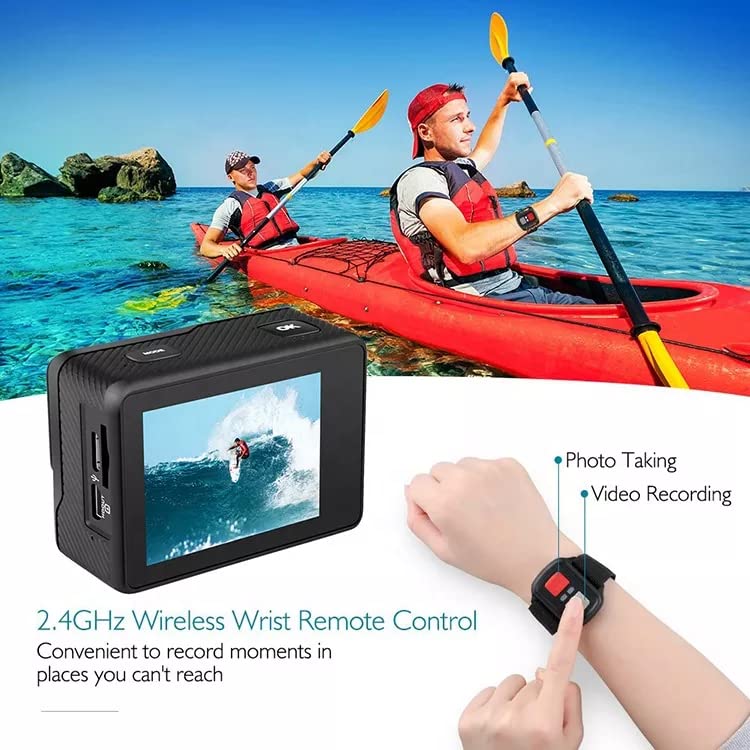
Image 5.4: A visual demonstration of the 4X digital zoom capability, showing the scene at 1x, 2x, and 4x magnification.
5.5. अतिरिक्त कार्य
The camera includes a variety of functions such as loop recording, time-lapse recording, slow motion, self-timer, burst photo, screen saver, upside down mode, and white balance adjustments. Explore these options in the camera's settings menu to enhance your recording experience.
6. रखरखाव
- सफाई: Use a soft, lint-free cloth to clean the camera lens and screens. For the waterproof case, rinse with fresh water after saltwater use and allow to air dry.
- बैटरी की देखभाल: Store the battery in a cool, dry place. Avoid extreme temperatures. If not using the camera for an extended period, remove the battery.
- भंडारण: Store the camera and accessories in a dry, dust-free environment away from direct sunlight.
7। समस्या निवारण
| संकट | संभावित कारण | समाधान |
|---|---|---|
| कैमरा चालू नहीं होता. | बैटरी ख़त्म हो गई है या सही ढंग से नहीं डाली गई है। | बैटरी को पूरी तरह चार्ज करें। सुनिश्चित करें कि बैटरी सही ध्रुवता के साथ लगाई गई है। |
| वीडियो रिकॉर्ड नहीं कर सकते/फ़ोटो नहीं ले सकते. | माइक्रोएसडी कार्ड भरा हुआ है, डाला नहीं गया है, या खराब हो गया है। | Insert a MicroSD card. Format the card (this will erase all data). Replace with a new card if corrupted. |
| वाई-फाई कनेक्शन समस्याएँ. | Incorrect password, camera Wi-Fi not enabled, or app issues. | Ensure Wi-Fi is enabled on camera. Double-check password. Restart camera and app. |
| Audio is less audible when using waterproof case. | Waterproof case seals the microphone. | This is normal. For better audio, use the camera without the waterproof case in dry environments. |
For more detailed troubleshooting, please refer to the full user manual or contact customer support.
8. विनिर्देश
| विशेषता | विवरण |
|---|---|
| वीडियो रिज़ॉल्यूशन | 4K/60FPS, 2.7K/30FPS, 1080P/120FPS, 720P/120FPS |
| फोटो रिज़ॉल्यूशन | 24एमपी |
| छवि स्थिरीकरण | EIS (Electronic Image Stabilization) |
| लेंस कोण | 170° चौड़ा कोण |
| जलरोधी गहराई | Up to 30m (with included waterproof case) |
| डिस्प्ले स्क्रीन | 2.0 inch Rear Touch Screen + 1.3 inch Front Color Screen |
| डिजिटल ज़ूम | 4X |
| भंडारण समर्थन | MicroSDHC up to 128 GB (Class 10 or higher, not included) |
| कनेक्टिविटी | वाई-फाई, एचडीएमआई |
| बैटरी की क्षमता | 1050mAh ली-आयन बैटरी |
| रिमोट कंट्रोल | Bluetooth Remote Included |
| सामग्री | Steel Body & Covering Plastic |
9. वारंटी और समर्थन
Your AUSEK® 4K Action Camera comes with a 3 महीने की वारंटी खरीद की तारीख से, निर्माण संबंधी दोषों को कवर करते हुए। कृपया वारंटी दावों के लिए अपनी खरीद का प्रमाण संभाल कर रखें।
For technical support, troubleshooting assistance, or warranty inquiries, please contact AUSEK customer support. Contact details can typically be found on the product packaging or the official AUSEK webसाइट।
Manufacturer Contact: AUSHA EXPORTS P LTD-140, SECTOR 27, GURUGRAM-122009, CUSTOMER SUPPORT 08048977694
Ask a question about this manual
Ask about setup, troubleshooting, compatibility, parts, safety, or missing instructions. Manuals+ फिर से होगाview the question and use this page’s manual context to help answer it.