
परिचय
This manual provides comprehensive instructions for the Walimex Pro 800/8.0 DX Telephoto Mirror Lens, specifically designed for Pentax K-mount cameras. This lens offers an 800mm fixed focal length and an f/8.0 aperture, making it suitable for long-distance photography. Its robust metal construction ensures durability and consistent image quality. The lens features manual focus and a minimum focusing distance of 2 meters, allowing for detailed close-up shots despite its telephoto capabilities.
When used with compatible digital SLR cameras, the effective focal length can be extended, providing significant magnification for distant subjects. Please read this manual carefully to ensure proper use and maintenance of your lens.
उत्पाद की विशेषताएँ
- Fixed Focal Length: 800mm for powerful telephoto capabilities.
- Fixed Aperture: f/8.0, characteristic of mirror lenses.
- मैनुअल फोकस: Precise control over focusing.
- न्यूनतम फोकसिंग दूरी: 2 meters, enabling close-up photography of distant subjects.
- मजबूत निर्माण: Durable metal housing for longevity and stability.
- अनुकूलता: Designed for Pentax K-mount cameras, also compatible with other systems via appropriate T2 adapters.
- संक्षिप्त परिरूप: Despite its long focal length, the mirror lens design allows for a relatively compact form factor.
पैकेज सामग्री
पैकेज खोलने पर, कृपया सत्यापित करें कि निम्नलिखित सभी आइटम इसमें शामिल हैं:
- Walimex Pro 800/8.0 DX Telephoto Mirror Lens
- फ्रंट लेंस कैप
- रियर लेंस कैप
- T-Mount Adapter (specific to Pentax K-mount, labeled T-PK)
- नरम ले जाने वाली थैली

छवि विवरण: A white and black Walimex Pro 800mm f/8.0 telephoto mirror lens, shown from a slightly angled front view. The lens has a ribbed focus ring and a gold nameplate with "walimex pro 800 mm f/8.0" inscribed. This is the main product image.

छवि विवरण: A black, soft carrying pouch with a drawstring closure, designed to protect the Walimex Pro lens during transport and storage.

छवि विवरण: A black T-mount adapter, labeled "T-PK", used to connect the Walimex Pro lens to a Pentax K-mount camera body. It features screw threads on the inside and a bayonet mount on the outside.
स्थापित करना
Follow these steps to properly attach your Walimex Pro 800/8.0 DX lens to your Pentax K-mount camera.
- Prepare the Lens: Ensure the rear lens cap is removed from the Walimex Pro 800/8.0 DX lens.
- Attach the T-Mount Adapter: If the T-PK adapter is not already attached to the lens, carefully screw it onto the rear thread of the lens until it is secure. Do not overtighten.
- कैमरा तैयार करें: Remove the body cap from your Pentax K-mount camera. Ensure the camera's power is off.
- Mount the Lens: Align the red dot or indicator on the T-PK adapter with the corresponding mark on your camera's lens mount. Gently insert the lens and rotate it clockwise until it clicks into place, indicating it is securely locked.
- अनुलग्नक सत्यापित करें: Lightly twist the lens to confirm it is firmly attached to the camera body.

छवि विवरण: A diagram illustrating the Walimex Pro 800mm lens connected to a mirrorless camera (CSC) via a T2 adapter. The lens dimensions (111mm height, 113mm length, 138mm total length with adapter) are indicated.

छवि विवरण: A diagram illustrating the Walimex Pro 800mm lens connected to a DSLR camera (SLR) via a T2 adapter. The lens dimensions (111mm height, 113mm length, 138mm total length with adapter) are indicated.
ऑपरेटिंग निर्देश
The Walimex Pro 800/8.0 DX is a manual focus lens with a fixed aperture. Understanding these characteristics is key to successful operation.
- कैमरा सेटिंग्स:
- अपना कैमरा इस पर सेट करें मैनुअल (एम) or Aperture Priority (Av/A) तरीका।
- Since the lens has a fixed aperture of f/8.0, you will primarily control exposure using shutter speed and ISO.
- सक्षम "Shoot without lens" or a similar setting in your camera's menu if available, as the camera may not detect the manual lens.
- ध्यान केन्द्रित करना:
- Look through your camera's viewखोजें या लाइव का उपयोग करें View एलसीडी स्क्रीन पर।
- Rotate the focus ring on the lens (the ribbed section) until your subject appears sharp.
- For critical focus, especially with an 800mm lens, use your camera's focus peaking or magnification features in Live View.
- Due to the long focal length, even slight movements can cause blur. A sturdy tripod is highly recommended for sharp images.
- खुलासा:
- Adjust the shutter speed and ISO sensitivity on your camera to achieve the desired exposure.
- Consider using a remote shutter release to minimize camera shake.
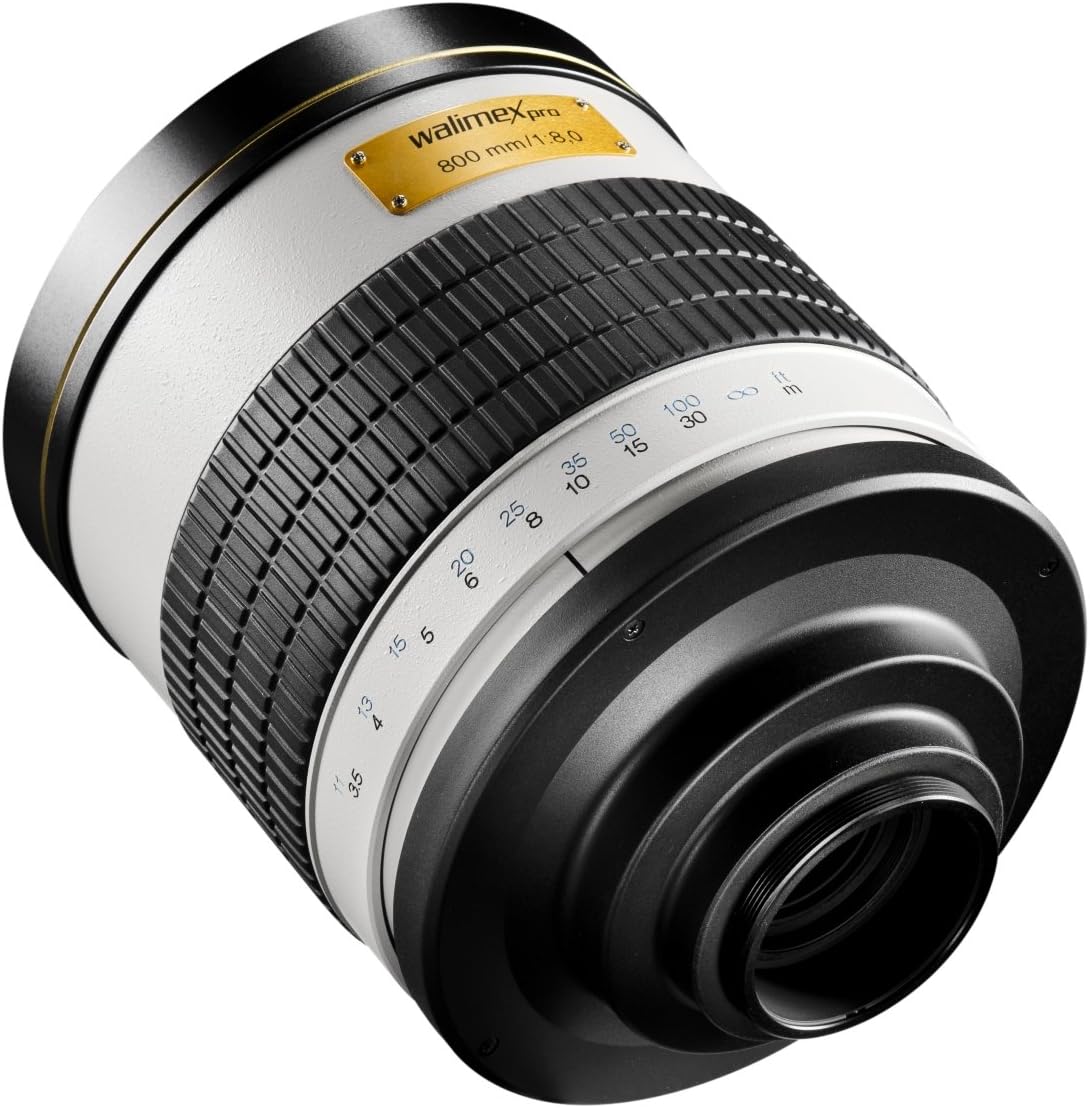
छवि विवरण: A rear-angled view of the Walimex Pro 800mm lens, highlighting the ribbed manual focus ring and the T-mount adapter connection point.
रखरखाव
Proper care and maintenance will extend the life and performance of your Walimex Pro lens.
- लेंस की सफाई:
- Use a blower brush to remove dust and loose particles from the lens surfaces.
- For smudges or fingerprints, use a clean microfiber lens cloth and a small amount of lens cleaning solution. Apply the solution to the cloth, not directly to the lens.
- घर्षणकारी पदार्थों या कठोर रसायनों का कभी भी प्रयोग न करें।
- भंडारण:
- Always attach both front and rear lens caps when the lens is not in use.
- Store the lens in its protective carrying pouch in a cool, dry place, away from direct sunlight and extreme temperatures.
- लेंस को अधिक नमी वाले क्षेत्रों में रखने से बचें ताकि फफूंद न लगे।
- हैंडलिंग:
- Handle the lens carefully to avoid dropping or impacting it.
- When mounting or unmounting, hold the lens firmly by its barrel, not by the focus ring.
समस्या निवारण
If you encounter issues with your Walimex Pro 800/8.0 DX lens, refer to the following common problems and solutions.
- Problem: Images are consistently blurry or out of focus.
- समाधान 1: Ensure you are using manual focus correctly. Rotate the focus ring slowly and deliberately. Utilize your camera's Live View magnification or focus peaking features for precise focusing.
- समाधान 2: Camera shake is a significant factor with an 800mm lens. Use a sturdy tripod and a remote shutter release or the camera's self-timer to minimize movement during exposure.
- समाधान 3: Check your shutter speed. For an 800mm lens, a very fast shutter speed (e.g., 1/1000s or faster, depending on conditions) is often required to freeze motion and counteract shake, even on a tripod.
- Problem: Camera does not take a picture or displays an error message ("Lens not attached").
- समाधान 1: सुनिश्चित करें कि लेंस कैमरे के मुख्य भाग पर मजबूती से लगा हुआ है।
- समाधान 2: Many cameras require a setting like "Shoot without lens" or "Release shutter without lens" to be enabled when using fully manual lenses without electronic contacts. Consult your camera's instruction manual to find and enable this setting.
- Problem: Images are too dark or too bright.
- समाधान: Since the aperture is fixed at f/8.0, adjust your camera's shutter speed and ISO settings to achieve correct exposure. In bright conditions, you may need a fast shutter speed and low ISO. In dim conditions, you may need a slower shutter speed (requiring a tripod) and/or higher ISO.
तकनीकी निर्देश
| विशेषता | विनिर्देश |
|---|---|
| ब्रांड | Walimex Pro |
| मॉडल संख्या | 15554 |
| फोकल लम्बाई | 800 मिमी (स्थिर) |
| छेद | f/8.0 (Fixed) |
| न्यूनतम फोकस दूरी | 2 मीटर |
| फोकस प्रकार | मैनुअल फोकस |
| लेंस डिजाइन | Mirror Lens (Fixed) |
| माउंट प्रकार | T-Mount (requires specific T2 adapter for camera system, e.g., Pentax K) |
| संगत डिवाइस | Pentax *ist D, *ist Ds, *istDL, *ist DS2, *ist DL2, K100D, K110D, K100D Super, K200D, K10D, K20D, K-7, K-r, K-x, K-m, Samsung GX-Series & Pentax AF/MF |
| आयाम (लम्बाई x चौड़ाई x ऊँचाई) | 11 x 11 x 13 सेमी (उत्पाद) |
| वज़न | 946 ग्राम |
| रंग | सफ़ेद |
| छवि स्थिरीकरण | नहीं |
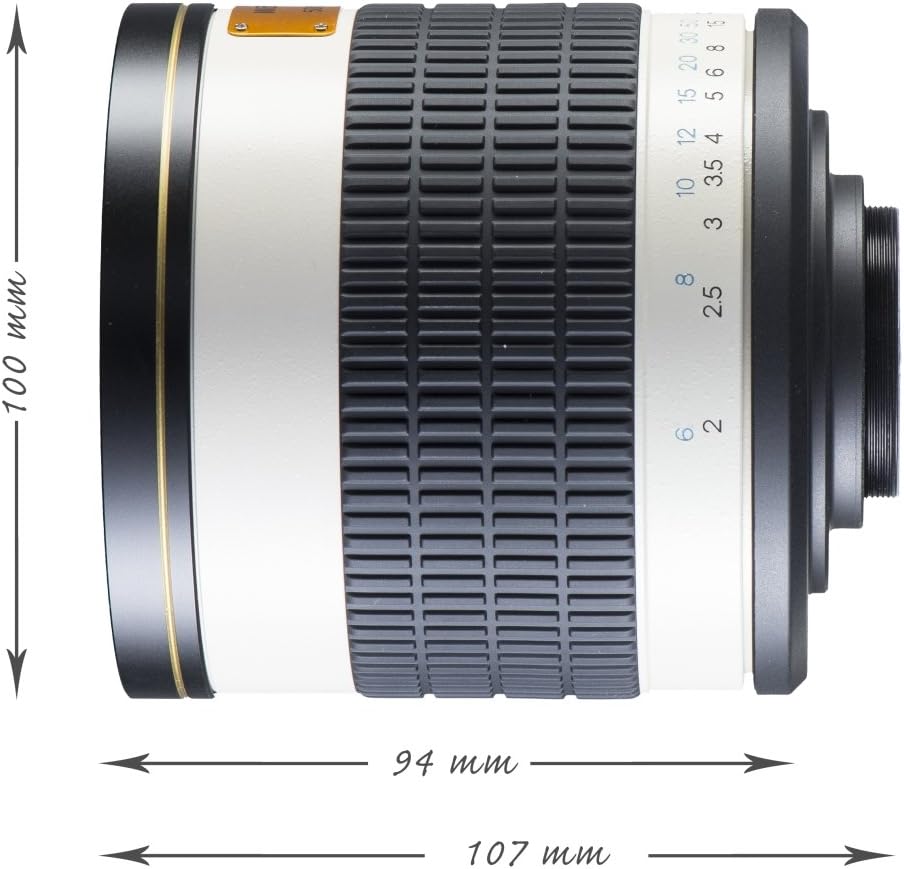
छवि विवरण: एक पक्ष view diagram of the Walimex Pro 800mm lens, indicating its dimensions: 100mm height, 94mm width, and 107mm length.
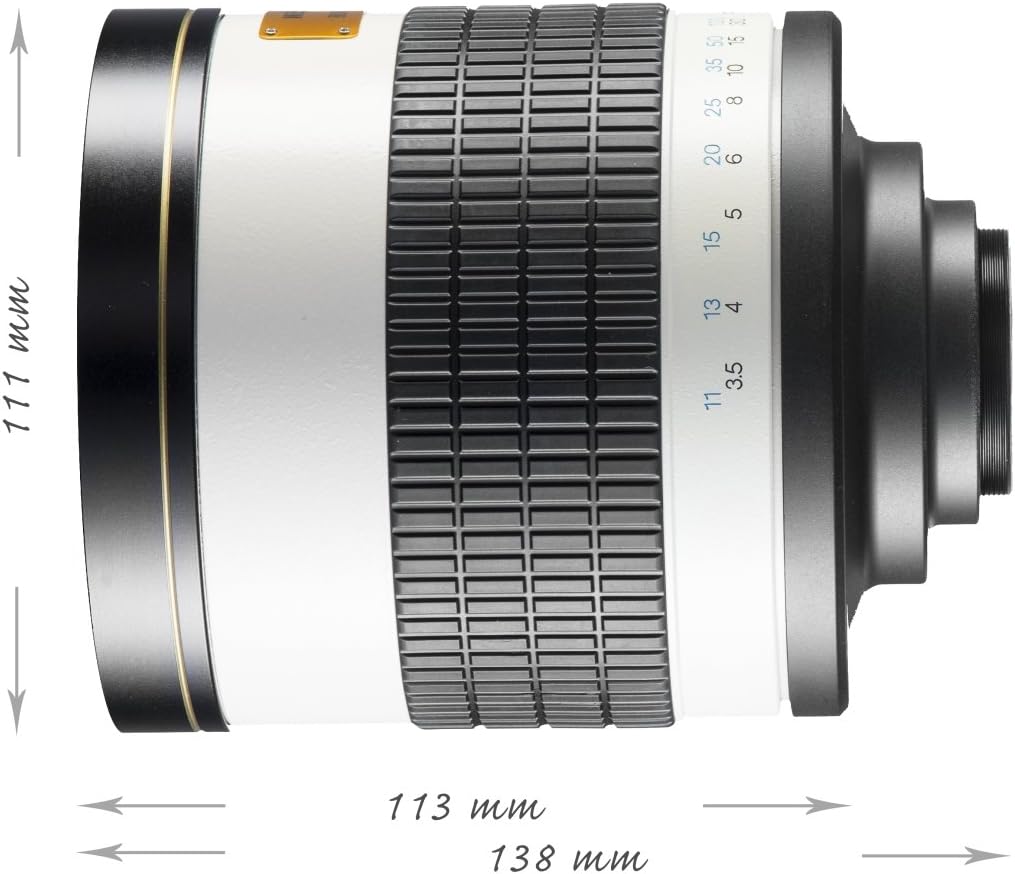
छवि विवरण: दूसरा पक्ष view diagram of the Walimex Pro 800mm lens, indicating slightly different dimensions: 111mm height, 113mm width, and 138mm length. These variations might refer to different measurement points or inclusion of lens caps/adapters.
वारंटी और समर्थन
For information regarding warranty coverage, technical support, or service, please refer to the documentation provided with your purchase or contact Walimex Pro customer service directly. Keep your proof of purchase for warranty claims.
You can often find contact information for Walimex Pro on their official webसाइट या उस रिटेलर के माध्यम से जहां से आपने उत्पाद खरीदा था।